 AdsToSlide
How credits work — and when a report is free
What each draft costs, when no credit is deducted and how to check what every presentation cost.
2026-10-28
Credits are only used when a presentation is generated. There is no monthly fee per client and no charge for browsing, setting up clients or creating tasks.
One paid page = one credit
Every paid content page uses one credit, so a presentation costs as many credits as it has paid pages. Basic, Standard and Detail are ready-made example drafts — you can build your own with any number of pages.
| Example draft | Content pages | Credits |
|---|---|---|
| Basic | 4 | 3 |
| Standard | 7 | 6 |
| Detail | 9 | 8 |
The cover and the closing slide are free. The exact cost is shown in the Quick Presentation dialog and in the task form before anything is generated.
When no credit is deducted
- Cached data: if data for the same client and period was prepared in the last 30 minutes, it is reused and the presentation costs 0 credits. Changing the draft and regenerating right away is free.
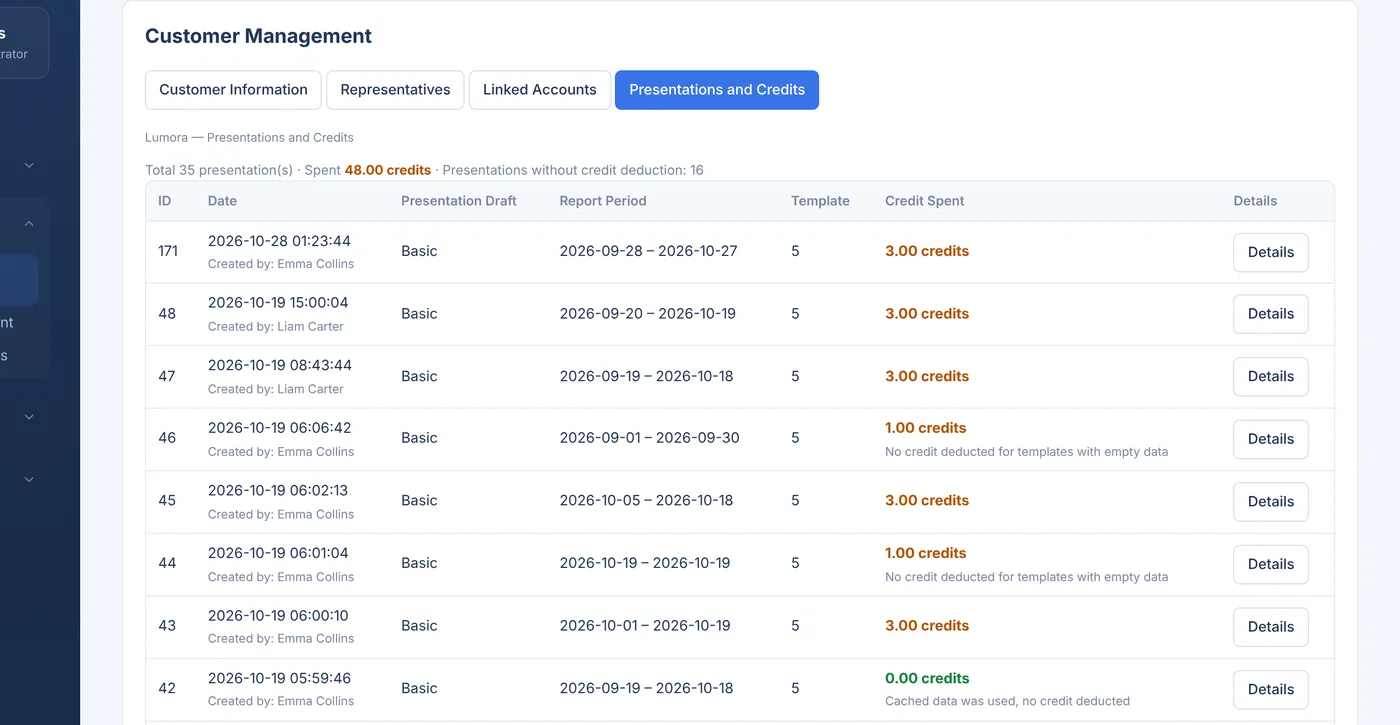
- Slides with no data: if a slide has nothing to show for the period — for example no conversions — it is not charged. A Basic report with an empty slide can cost 1 or 2 credits instead of 3.
Checking where credits went
Open a client and switch to Presentations and Credits. The summary at the top shows the total number of presentations, the credits spent and how many were created without a deduction. Each row shows who created it, the period, the draft and a link to the template details.
Your remaining balance is always visible at the top of the dashboard.
Estimating a month
Multiply clients × reports per client × paid pages per report. Twenty clients with a 6-page report once a month is 20 × 1 × 6 = 120 credits. Use the calculator on the pricing page to try your own numbers.